
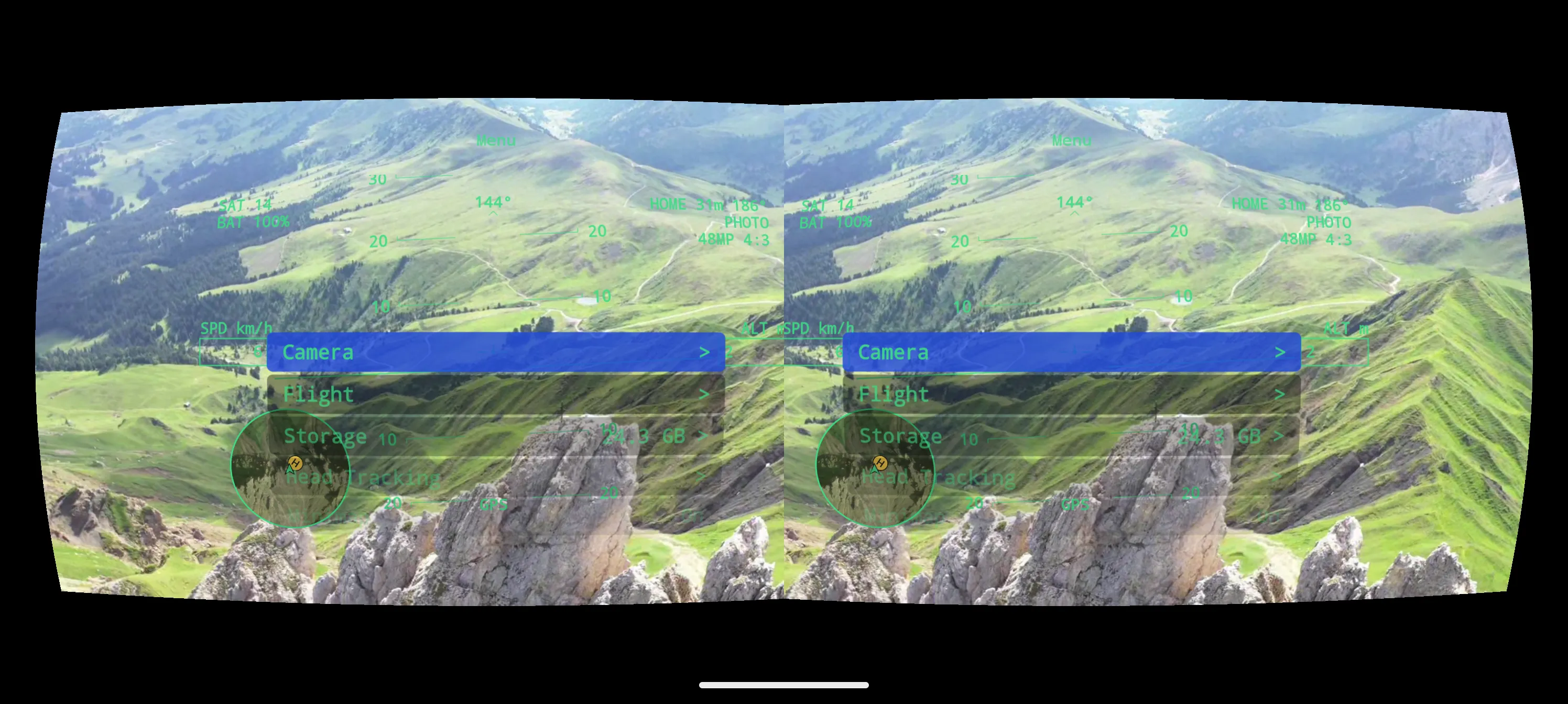
FPV stands for first-person view: instead of watching your drone from the ground, you see what its camera sees, live, as if you were sitting in the cockpit. Drone FPV is the closest thing to flying yourself — and with DroneXR you don’t need special goggles for it. Your phone is the screen, a simple VR headset puts it in front of your eyes, and your DJI drone does the flying.
FPV drone or drone FPV?
You may have seen FPV drones — racing quads or DJI Avata — that come with their own goggles and are built for acrobatics. That is one kind of FPV. The other is flying the camera drone you already own, such as a DJI Mini, Air or Mavic, from the first-person view.
DroneXR is the second kind. Your drone flies exactly as it always does: same remote controller, same stabilisation, same Return to Home. What changes is what you see — the drone’s live camera feed, in your headset, with everything you need to know about the flight floating in front of you.
What you need
- A compatible DJI drone. DroneXR on Android flies the DJI Mini 4 Pro, Mini 3 Pro and Mini 3. DroneXR on iPhone flies the drones on DJI’s previous developer kit — Mavic, Air 2S, Phantom, Spark, Mini 2 and more. The compatibility list shows every drone and which app flies it.
- Its remote controller and a USB cable. Your phone stays plugged into the controller for the whole flight — see Connect your drone.
- A phone. A 64-bit Android phone with Android 7.0 or newer, or an iPhone. Live stereo video is demanding, so a recent mid-range or better phone gives the smoothest picture.
- A phone-in VR headset. The simple kind with two lenses and no electronics. It must leave your phone’s USB port reachable and ideally has adjustable lenses and a head strap — Choose and set up your headset explains what to look for.
- A spotter. Someone next to you who keeps the drone in sight while you fly (more on that below).
You don’t need DJI Goggles, and you don’t need a new drone.
What drone FPV looks like in DroneXR
A view for each eye
DroneXR renders the live feed once for each eye, corrected for your headset’s lenses. You calibrate it once per headset — lens distance, scale and distortion — and the app keeps a profile for every headset you own, so the picture is sharp and comfortable each time you put it on.
A head-up display
Like a pilot’s HUD, the readouts float in front of the video: ground speed (SPD), altitude (ALT), GPS satellites (SAT), drone battery (BAT), and the distance and direction to your home point (HOME). A compass tape shows your heading, and a minimap keeps you oriented relative to home. Your first FPV flight explains each readout.
Head tracking
Turn your head and the drone’s camera follows. On DJI Mini drones the camera tilts up and down with your head; on drones whose gimbal can do more, such as the Mavic and Inspire series, head tracking also covers yaw and roll. Three profiles — Fast, Medium and Cinematic — set how quickly the camera follows. See Head tracking.
Everything without taking the headset off
The in-flight menu opens in the headset and is driven with your controller’s sticks, so you can change camera, flight and head-tracking settings mid-air. You can also take photos and record video from the headset, and DroneXR logs every flight — track, graphs and statistics — privately on your phone.
Fly drone FPV safely
- Start slow. FPV feels faster than flying by sight, and depth is harder to judge.
- Watch BAT and HOME. Turn back with plenty of battery left.
- Know your Return to Home. If the video freezes or you lose your bearings, use RTH on your controller — and set your drone’s RTH altitude before your first flight.
- Sit down for your first flights, and take a break when you feel dizzy or tired.
Try drone FPV before you fly
You can see exactly what drone FPV looks like before your drone ever leaves the ground. The Demo plays a recorded flight over the Dolomites with simulated telemetry — full stereo view, HUD and menu, no drone needed, always free. When you are ready, the free trial lets you take your own drone up in DroneXR before you unlock unlimited flying in the app.
Common questions
Which drones does DroneXR work with?
DroneXR on Android uses DJI’s MSDK v5 and supports the DJI Mini 4 Pro, Mini 3 Pro. DroneXR on iOS uses DJI’s MSDK v4 and supports the older DJI drones Mavic, Air 2S, Phantom, Spark, Mini 2 and more — on iOS. On Android, DroneXR may also supports other drones on DJI’s current MSDKv5 developer kit through its general DJI support but was not tested against them.
The compatibility list shows every drone and which app flies it.
Which VR headset do I need?
DroneXR works with any phone-in VR headset that your phone fits into — the simple kind with two lenses and no electronics. Make sure it leaves your phone’s USB port reachable, because the phone stays plugged into the remote controller, and ideally has adjustable lenses and a head strap.
Choose and set up your headset covers what to look for and how to calibrate DroneXR for it.
Do I need DJI Goggles?
No. DroneXR uses your phone as the screen: it stays connected to your drone’s remote controller by USB cable, and you slip it into a simple phone-in VR headset.
Which VR headset do I need? explains what to look for.
Am I allowed to fly FPV with a headset?
In the EU and many other countries, yes — as long as a spotter next to you keeps the drone in direct sight. Some countries have stricter rules, and local restrictions — airports, nature reserves, crowds — always apply.
Check your national aviation authority’s rules before you fly. It is your responsibility to follow them.
What is the difference between the Demo and the free trial?
The Demo plays a recorded flight with simulated telemetry. It shows the full VR experience — HUD, menu, stereo view — needs no drone, and is always free.
The free trial lets you fly your own drone with DroneXR a limited number of times, so you can check it works with your drone, phone and headset before you unlock unlimited flying in the app.
Is DroneXR an official DJI app?
No. DroneXR is an independent app by Appologics, built on DJI’s Mobile SDK — the developer kit DJI offers so that other apps can connect to its drones. DJI is a trademark of SZ DJI Technology Co., Ltd. DroneXR is not affiliated with or endorsed by DJI.